Instructional Guidelines — Interactive Quick Reference Tool
Project Overview

Designing an interactive quick reference tool to support instructional designers working within a highly governed learning production environment.

The tool consolidates multiple process guidelines, standards, and norms into a single, navigable reference that supports speed, consistency, and instructional quality during day-to-day design work.

Designing the Quick Reference Tool

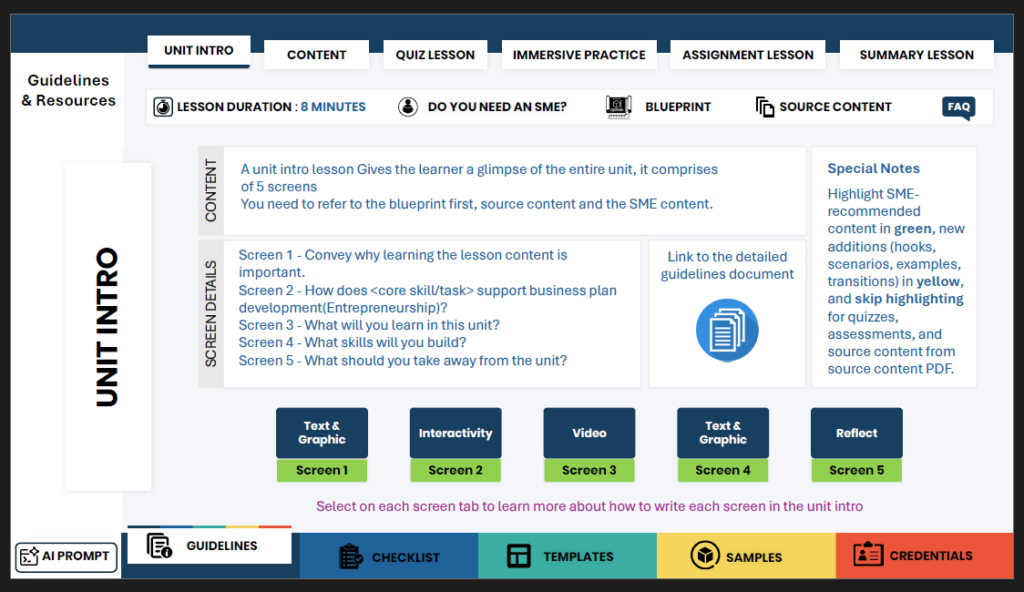
The tool is designed as an interactive PDF that functions as a single source of truth for instructional guidance across lesson components and screen types.

Rather than presenting guidelines as static documentation, the tool organises guidance by instructional task, allowing designers to quickly access relevant rules, examples, and constraints at the point of use.

Client Context

Instructional designers were working with a large volume of dispersed guideline documents covering structure, narration, interactivity, accessibility, and delivery expectations. This resulted in frequent context switching, inconsistent interpretation, and increased cognitive load during production.

The client needed a practical reference system that designers could rely on during active design work—one that reduced friction while maintaining alignment with established instructional and quality standards.

What this tool is (and isn’t)​

  • It is an interactive performance support tool, not a static guideline document.

  • It provides task-aligned instructional guidance at the screen and component level.

  • It supports consistent application of design rules across lessons and teams.

  • It is not a replacement for instructional judgment or detailed training.

Usage note:
This interactive PDF is designed to function fully when downloaded and opened locally on a computer. Some interactive elements may not work as intended when viewed in a browser.

Design Approach​

The tool is structured around how instructional designers actually work. Guidance is organised by lesson components such as introductions, content screens, quizzes, immersive practice, assignments, and summaries.

Each section follows a consistent interaction pattern, presenting writing intent, do-and-don’t rules, timing guidance, accessibility considerations, and development notes. Navigation and layout are intentionally predictable to minimise cognitive overhead and enable rapid reference during production.

Key Components

  • Interactive navigation across lesson components

  • Screen-level instructional guidance and writing intent

  • Do-and-don’t rules aligned to production standards

  • Timing and pacing recommendations

  • Accessibility and development considerations

  • Consistent visual structure to support quick scanning

Role & Contribution

I designed the overall structure, interaction logic, and instructional framing of the tool.

This included consolidating multiple guideline sources, translating abstract standards into actionable screen-level guidance, and designing the navigation and layout to function as a practical reference during active instructional design work.

Outcome

The quick reference tool enables instructional designers to work more efficiently while maintaining alignment with instructional and quality expectations.

It reduces reliance on multiple documents, supports consistency across assets, and helps teams apply standards accurately without slowing down production.


Reflection

This work demonstrates the value of designing performance support for instructional designers themselves. By embedding guidance into an interactive, task-aligned reference, the tool balances governance with usability—supporting quality at scale without adding process friction.

Description

Usage note:
This interactive PDF is designed to function fully when downloaded and opened locally on a computer. Some interactive elements may not work as intended when viewed in a browser.

Interactive quick reference tool designed as a single source of truth for instructional design guidelines.